Contact Expert v7.4 for Skype for Business Server
Routing Types and Statuses in External Interaction Routing
Overview
This chapter explains the meaning of the different routing statuses and types available when external interaction routing is enabled in CE.
Read more about External Interaction Routing.
Meaning of Routing Types in case of External Interaction Routing
Interaction routing is performed according to the ACD logic set for the affected system. There are two kinds of interaction routing: Internal and External.
| Internal routing | it means that the interaction is performed according to the default ACD logic set within CE. |
| External routing | it means that the interaction is performed according to the distribution logic set in the 3rd party application or plugin. |
Routing Statuses
Routing is the act of pairing a work item (interaction) to an agent. Routing statuses represent the state of the interaction pairing process.
There are six routing statuses defined:
| Status | Routing Type | Description |
|---|---|---|
| Success | Internal & External | Interaction routing was successful according to the requirements and the defined parameters. |
| Failed | Internal & External | Interaction routing did not happen according to the requirements and the defined parameters. |
| Timeout | External only | Interaction routing time is longer than the defined 'Request Timeout' interval. Transmission is performed according to the default ACD logic determined in CE. |
| Ignored | External only | Interaction routing request is sent to the 3rd party plugin, but it is busy with other tasks (e.g.: bench-marking) and does not respond. Transmission is performed according to the default ACD logic determined in CE. |
| Agent not available | Internal & External | Interaction routing request is sent, but the agent goes on a break or offline during the process. No routing is performed. |
| Interaction not available | Internal & External | Interaction routing request is sent, but customer abandons the queue during the process. No routing is performed. |
Routing Examples
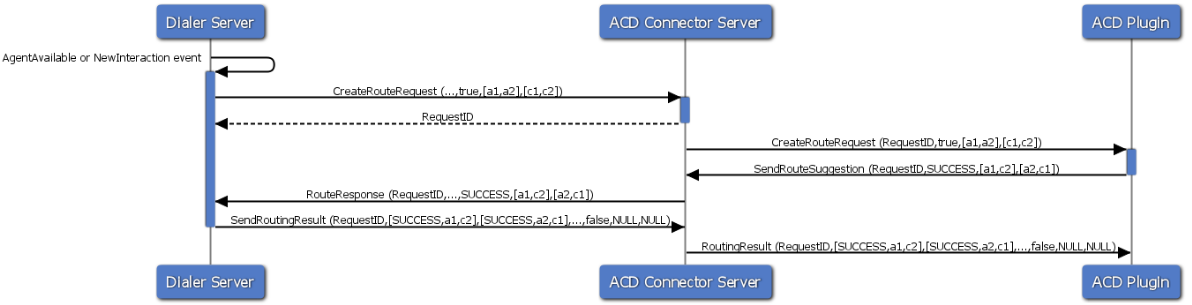
Example 1: Successful routing
Event: Agent Available or New Interaction
- Information is sent to the
Dialer Server. - the
Dialer Servercreates Route Request towards theACD Connector Server.- Agent1 and Agent2 are available. Customer1 and Customer2 are online.
- Request ID is generating.
- The
ACD Connector Serversends Route Request towards theACD Plugin. - The
ACD Pluginsends its Route Suggestion back to theACD Connector Server.- Agent1 to be paired with Customer2 and Agent2 to be paired with Customer1.
- Route Response is sent from the
ACD Connector Serverback to theDialer Server. - The
Dialer Serversends the routing result back to theACD Connector Serveraccording to the route suggestion from theACD Plugin. - The routing result is sent to the
ACD Pluginsuccessfully.
Example 2: Failed routing
Event: Agent Available or New Interaction
- Information sent to the
Dialer Server. - The
Dialer Servercreates Route Request towardsACD Connector Server.- Agent1 and Agent2 are available.
- Customer1 and Customer2 are online.
- Request ID is generating.
- The
ACD Connector Serversends the route request to theACD Plugin. - Agent3 now becomes available and Customer2 leaves the queue
- The route suggestion fails towards the
ACD Connector Server. - The route response fails towards the
Dialer Server. - The
Dialer Servercreates and sends a new Routing Result to theACD Connector Server.- Agent1 and Agent2 are available.
- Customer1 is online.
- The
ACD Connector Serverforwards the routing result to theACD Plugin, which generates a new route suggestion.- Agent2 to be paired with Customer1.
- The new route suggestion is sent to the
ACD Connector Serverand forwarded to theDialer Serverby theACD Connector Serversuccessfully. - The
Dialer Serversends the routing result back to theACD Connector Server, which is forwarded to theACD Pluginsuccessfully.

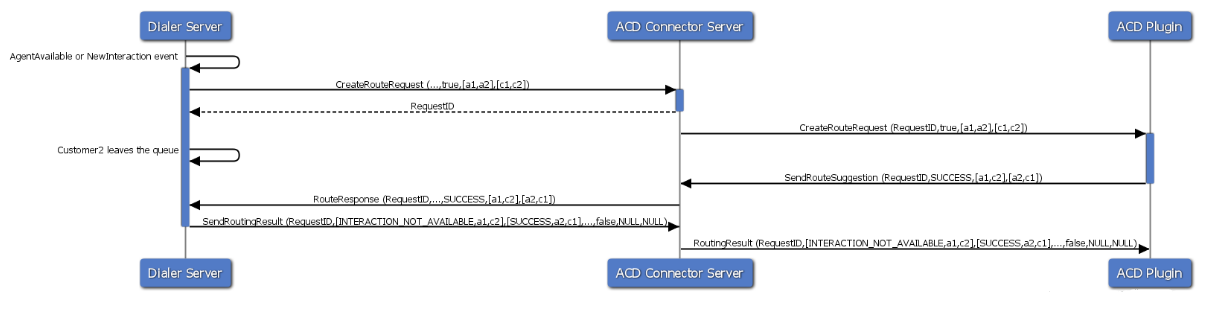
Example 3: Customer Abandons Queue During Routing Request
Event: Agent Available or New Interaction
- Information sent to the
Dialer Server. Dialer Servercreates Route Request towardsACD Connector Server.- Agent1 and Agent2 are available.
- Customer1 and Customer2 are online.
- Request ID is generating.
- The
ACD Connector Serversends the route request to theACD Plugin. - Customer2 leaves the queue.
- The
ACD Pluginsends its route suggestion back to theACD Connector Server.- Agent1 to be paired with Customer2.
- Agent2 to be paired with Customer1.
- The route response is sent from the
ACD Connector Serverback to theDialer Server. - The
Dialer Serversends the routing result toACD Connector Server.- Agent1 - Customer2 pairing fails with the routing status: Interaction Not Available.
- Agent2 - Customer1 pairing is successful.
- The routing result is sent to the
ACD Pluginsuccessfully.
Example 4: Agent is not available during routing request
Event: Agent Available or New Interaction
- Information sent to the
Dialer Server. - The
Dialer Servercreates the route request towards theACD Connector Server.- Agent1, Agent2 and Agent3 are available.
- Customer1 and Customer2 are online.
- Request ID is generating.
- The
ACD Connector Serversends the route request to theACD Plugin. - Agent2 becomes unavailable.
- The
ACD Pluginsends its route suggestion back to theACD Connector Server.- Agent1 to be paired with Customer2.
- Agent2 to be paired with Customer1.
- The route response is sent from
ACD Connector Serverback to theDialer Server. - The
Dialer Serversends the routing result to theACD Connector Server.- Agent1 - Customer2 pairing is successful.
- Agent2 - Customer1 pairing fails with the routing status: Agent Not Available.
- Agent3 gets paired with Customer1.
- The routing result is sent to the
ACD Plugin successfully.
!Agent Not Available](attachments/external_acd/agent_not_available.png)
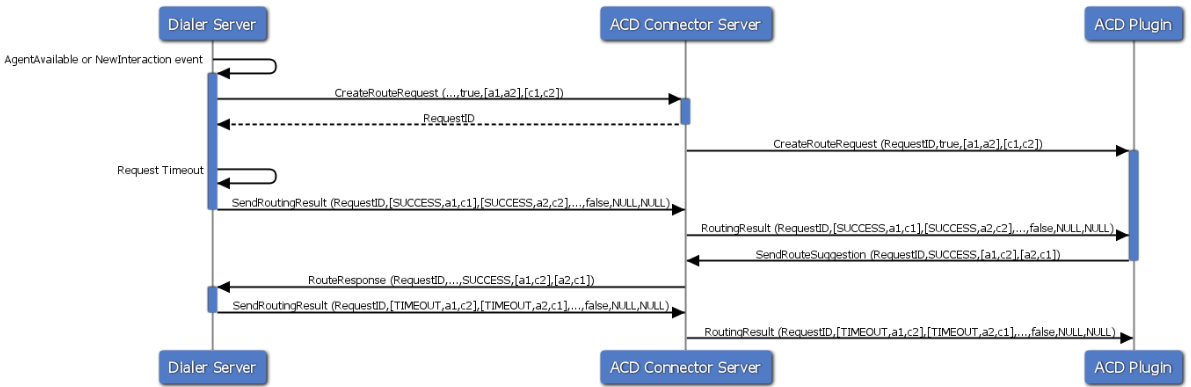
Example 5: Internal timeout during routing request
Event: Agent Available or New Interaction
- Information sent to the
Dialer Server. - The
Dialer Serversends the route request to theACD Connector Server.- Agent1, Agent2 and Agent3 are available.
- Customer1 and Customer2 are online.
- Request ID is generating.
- The
ACD Connector Serversends the route request to theACD Plugin. - The request times out.
- The
Dialer Serversends the routing result to theACD Connector Server. - The
ACD Connector Serversends the routing result to theACD Plugin. - The
ACD Plugincreates and sends the route suggestion to theACD Connector Server.- Agent1 to be paired with Customer2.
- Agent2 to be paired with Customer1.
- The
ACD Connector Serversends Route Response to Dialer Server. - The routing result is sent back to
ACD Connector Server` with the routing status: Timeout. - The
ACD Pluginreceives the routing result from theACD Connector Server. - The default ACD logic will kick in.